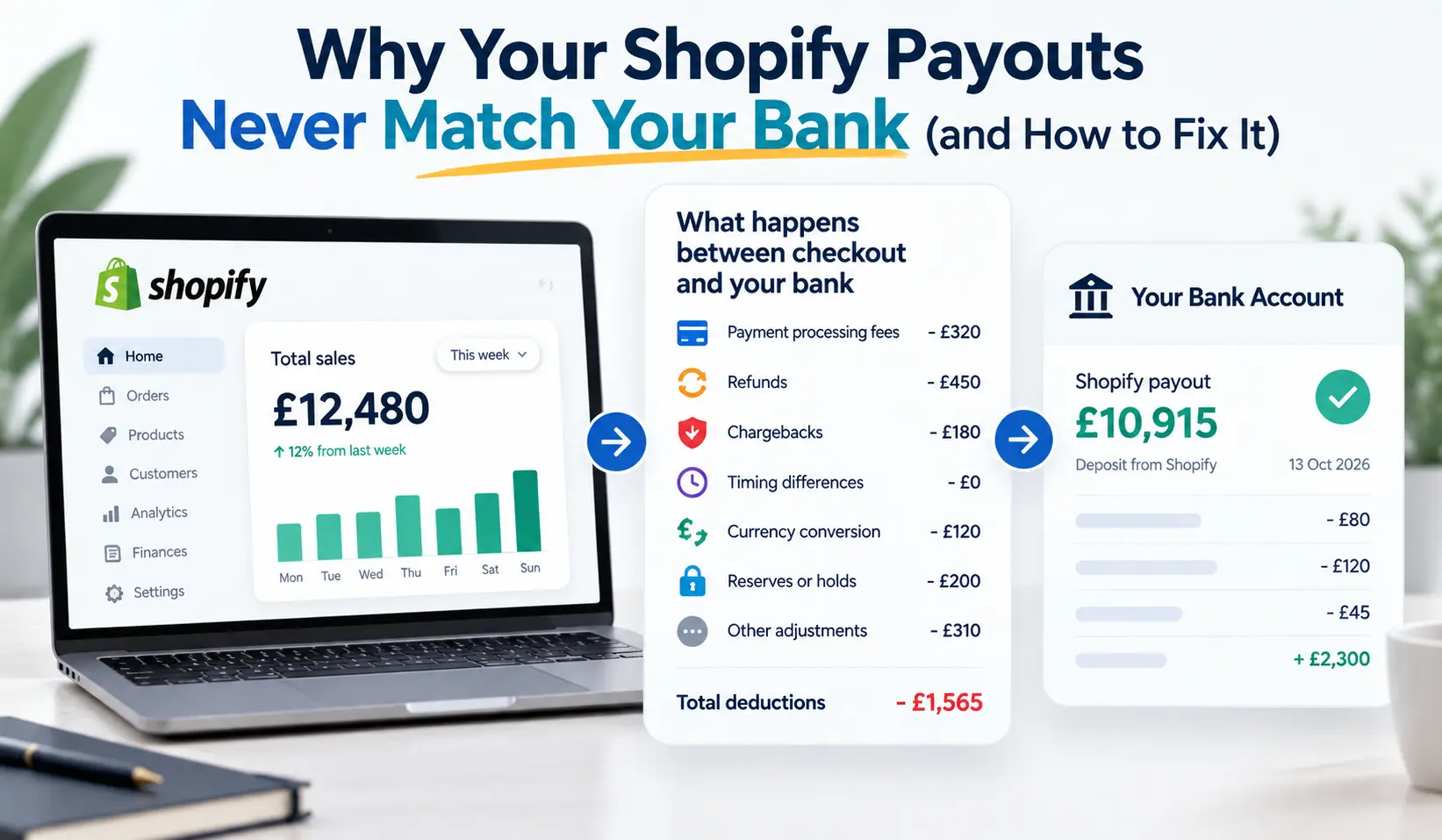
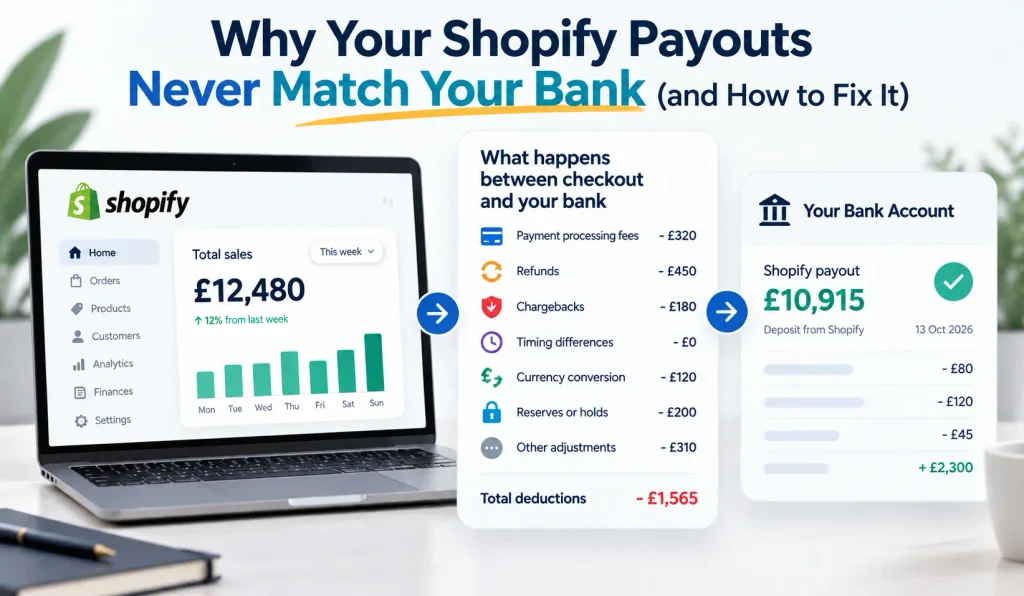
You check your Shopify dashboard and see £12,480 in sales for the week. Then you open your bank account and find £10,915 has landed. Somewhere between checkout and your bank, more than £1,500 seems to have disappeared. This is where Shopify payout reconciliation helps you understand the difference between your Shopify sales and the money received in your bank account.
If that sounds familiar, you are not alone. Shopify payouts not matching the bank is one of the most common reasons online sellers come to us with books that need rescuing. It is also one of the most misunderstood problems in e-commerce bookkeeping.
The good news is that the money has rarely vanished. In almost every case, the gap is explained by a handful of predictable things: payment processing fees, refunds, chargebacks, timing differences, currency conversion, reserves, and the way payouts are batched together.
The bad news is that if your bookkeeping simply records each payout as “sales”, your accounts are almost certainly wrong. Your revenue will be understated, your fees will be invisible, your VAT or sales tax figures may be off, and you will struggle to know your true profit margin.
In this guide, we explain exactly why Shopify payouts do not match your bank or your sales reports. We then walk through a practical, step-by-step process to reconcile them properly, whether you use Xero, QuickBooks or another accounting platform. By the end, you will know how to turn a confusing stream of deposits into clean, accurate, audit-ready books.
This guide is written for Shopify store owners, e-commerce finance teams and bookkeepers working with online sellers anywhere in the world, from the UK and Europe to the US, Australia and the Middle East.
Why don’t my Shopify payouts match my bank? The quick answer
Shopify payouts rarely match your sales total because each payout is a net figure. Shopify deducts transaction fees, refunds, chargebacks and other adjustments before sending the money. Payouts also combine orders from several days and may arrive after a delay. Shopify payout reconciliation helps explain these differences by recording gross sales and deductions separately through a clearing account, then matching each payout to the bank deposit.
Key takeaways
- A Shopify payout is a net figure, not your sales total.
- The usual causes of the gap are fees, refunds, chargebacks, reserves, currency conversion, timing and multiple payment gateways.
- Recording payouts as sales understates revenue, hides costs and can distort VAT or sales tax.
- The fix is a Shopify clearing account: record gross sales and each deduction, then match each payout to the bank deposit.
- Connector apps such as A2X or Link My Books can automate this, but the setup must be correct first.
How Shopify Payouts Work Before Bank Reconciliation
A Shopify payout is a net transfer of money Shopify has collected for you after deducting fees, refunds and adjustments. Orders sit in a pending balance, are grouped into a batch and are sent to your bank on a schedule that depends on your country and account. One payout usually covers several days of orders. Understanding this process is an important part of Shopify payout reconciliation, as sales dates and bank deposit dates often differ.
Before you can reconcile anything, it helps to understand what a payout really is. A payout is not a sale. It is a transfer of money that Shopify (or your payment provider) has collected on your behalf, minus everything it has deducted along the way.
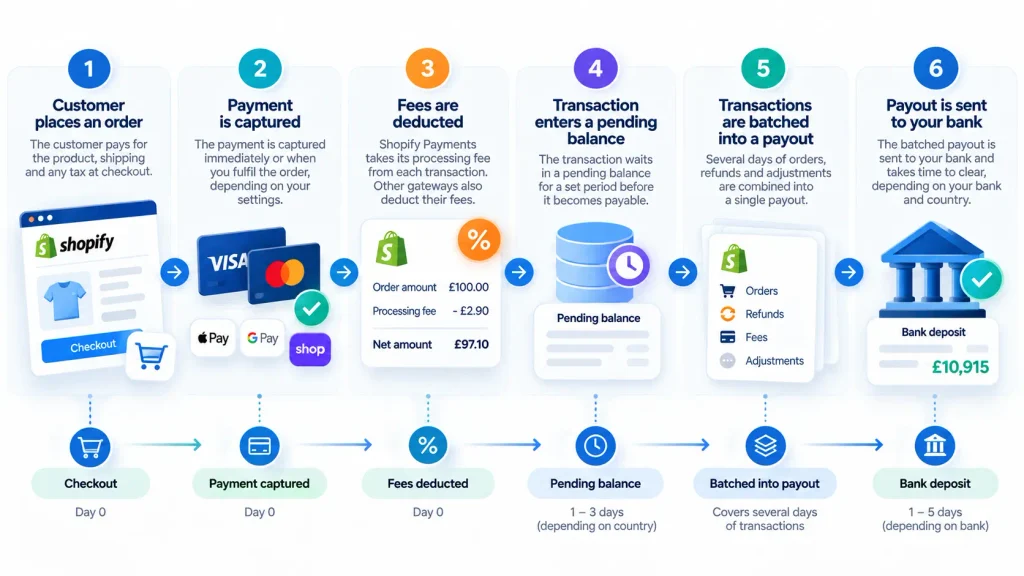
Here is the journey a typical order takes from checkout to your bank account:
- A customer places an order. They pay the product price plus shipping and any tax charged at checkout.
- The payment is captured. Depending on your settings, this happens immediately or when you fulfil the order.
- Fees are deducted. Shopify Payments takes its processing fee from each transaction. Other gateways do the same.
- The transaction enters a pending balance. It waits there for a set period before it becomes payable.
- Transactions are batched into a payout. Several days of orders, refunds and adjustments are combined into a single figure.
- The payout is sent to your bank. It then takes time to clear, depending on your bank and country.
Payout schedules vary by country and account
Shopify Payments operates on a payout schedule that depends on where your business is based and how your account is set up. Some merchants are paid daily, others weekly or monthly. The delay between a sale and its payout also varies by region and can change if Shopify reviews your account.
This matters because your sales report is organised by order date, while your bank statement is organised by deposit date. Those two calendars almost never line up exactly, especially at month end.
You may have more than one payment stream
Many stores accept payments through several channels at once. A single Shopify store might take money through:
- Shopify Payments (cards, Apple Pay, Google Pay, Shop Pay)
- PayPal
- Stripe or another third-party gateway
- Buy now, pay later providers such as Klarna or Shop Pay Installments
- Manual payment methods such as bank transfer or cash on delivery
Each of these pays out separately, on its own schedule, with its own fees. Your Shopify sales report shows all of them together. Your bank shows each one arriving at a different time. That alone is enough to make the numbers look wildly different.
Shopify Payout Reports for Accurate Reconciliation
In your Shopify admin, the payouts section lists every payout with the transactions it contains. You can usually export this information as a CSV file. The report connects your sales records with the money received in your bank account. It is the starting point for accurate Shopify payout reconciliation, helping you identify fees, refunds, adjustments and differences between sales and deposits.
What causes Shopify payouts not to match your bank or sales report?
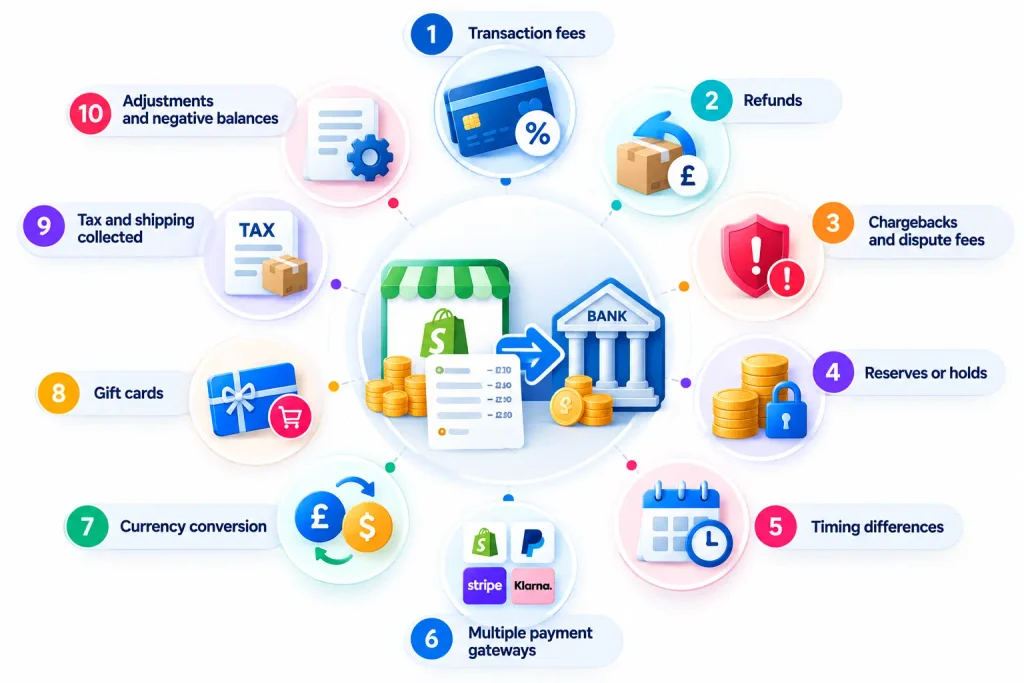
Shopify payouts can differ from sales because of ten common factors: processing fees, refunds, chargebacks, reserves, payout timing, multiple payment gateways, currency conversion, gift cards, taxes and shipping collected, and adjustments or negative balances. Most mismatches involve two or three of these factors in the same period. Accurate Shopify payout reconciliation helps you identify which transactions explain the difference.
| Cause | Effect on payout vs sales | How to record it |
|---|---|---|
| Transaction fees | Payout lower | Expense: merchant fees |
| Refunds | Payout lower | Reduce sales (and output tax) |
| Chargebacks and dispute fees | Payout lower, sometimes reversed later | Chargeback account plus fee expense |
| Reserves or holds | Payout lower or delayed | Asset: funds held by Shopify |
| Timing (cut-off) | Payout in a different period | Leave balance in clearing account |
| Other gateways | Not in Shopify payout at all | Separate clearing account per gateway |
| Currency conversion | Payout lower | Expense: FX fees, plus FX gain or loss |
| Gift cards | Cash received before revenue | Liability until redeemed |
| Tax and shipping collected | Sales report and payout both include them | Split out tax liability and shipping income |
| Adjustments and negative balances | Payout lower or bank debited | Investigate and code individually |
1. Payment processing fees
Every card transaction through Shopify Payments carries a processing fee, deducted before the money reaches you. The rate depends on your Shopify plan, your country and the card type. International and premium cards often cost more. If you record only the net payout, these fees never appear in your accounts, and your cost of selling is understated.
2. Refunds
When you refund a customer, Shopify takes the money from your next payout. A week with a large refund can produce a payout far smaller than that week’s sales. In some cases, the original processing fee is not returned to you on a refund, which adds a further small difference.
3. Chargebacks and dispute fees
If a customer disputes a charge with their bank, the disputed amount is withdrawn from your balance. A chargeback fee is usually added on top. If you win the dispute, the amount may be returned later, sometimes weeks afterwards and in a different month. Without careful tracking, chargebacks turn into unexplained gaps.
4. Reserves and payout holds
Shopify can hold back part of your balance as a reserve, particularly for newer stores, higher-risk products or a spike in disputes. Payouts can also be paused during an account review. That money still belongs to you, but it has not reached your bank. It should sit in your books as an asset, not disappear.
5. Timing and cut-off differences
Orders placed on the last days of the month are often paid out in the following month. Your sales report says one thing on 31 March, your bank says another. This is a timing difference, not an error. Handled correctly, the unpaid amount simply waits in a clearing account until the payout arrives.
6. Multiple payment gateways
PayPal, Stripe, Klarna and other providers pay you separately. Your Shopify sales report includes these orders, but they never appear in a Shopify Payments payout. Each gateway needs its own reconciliation.
7. Currency conversion
If you sell in several currencies, Shopify may convert foreign currency sales into your payout currency and charge a conversion fee. Exchange rates also move between the order date and the payout date. Both create differences that should be recorded as fees and foreign exchange gains or losses.
8. Gift cards
When a customer buys a gift card, you receive cash but have not yet made a sale. When the card is redeemed later, the order shows as a sale, but no new cash arrives. Treating gift card purchases as revenue overstates income and confuses reconciliation.
9. Taxes and shipping collected
The amount a customer pays includes VAT, GST or sales tax, plus shipping. Payouts include all of it. If your books treat the full payout as product sales, you will overstate revenue and may underpay or overpay tax. Tax collected belongs in a liability account until you pay it to the tax authority.
10. Adjustments, app charges and negative balances
Shopify may apply adjustments for things like shipping labels, disputes or corrections. If your balance goes negative, for example after a large refund, Shopify may take money from your bank account rather than paying you. These one-off movements are easy to miss and are often the last few pounds or dollars that refuse to reconcile.
How to Do Shopify Payout Reconciliation Step by Step
Shopify payout reconciliation starts with exporting your payout report and recording gross sales, tax, shipping, discounts and refunds for each payout. Record processing fees and chargebacks separately, then post the transactions through a Shopify clearing account. When the clearing account’s net movement matches the bank deposit, the payout is reconciled. Repeat this process for every payout and payment gateway.
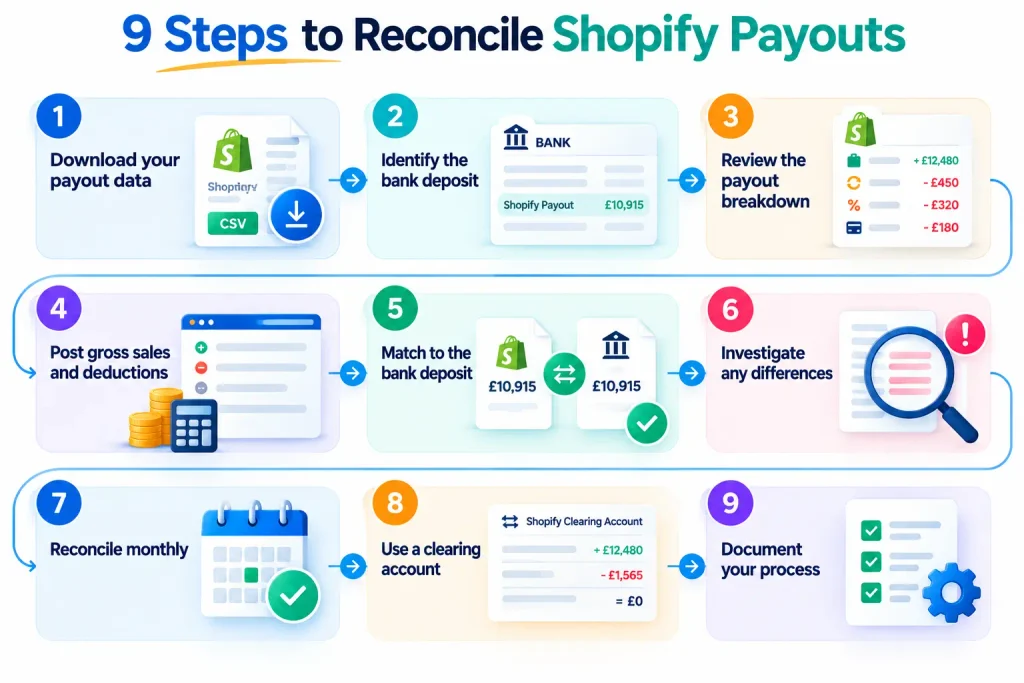
Here is the full process we use when rescuing a Shopify store’s books.
- Gather your reports. Export the Shopify payout report and the transactions within each payout for the period. Download your bank statements and statements from PayPal, Stripe and any other gateway.
- List every payout and match it to the bank. Create a simple list of each payout date, payout amount and the bank deposit it matches. Any payout without a matching deposit, or deposit without a payout, needs investigating straight away.
- Break each payout into its components. For each payout, total the gross product sales, discounts, shipping charged, tax collected, refunds, fees, chargebacks and adjustments. The components should add up exactly to the payout amount.
- Record the gross figures in your accounting software. Post sales, shipping income and tax to the correct accounts. Post fees, chargebacks and FX costs as expenses. All of this goes through a Shopify clearing account rather than straight to the bank.
- Match the payout to the bank deposit. When the money lands, match the bank deposit against the clearing account. If the components were recorded correctly, the clearing account moves back to zero for that payout.
- Repeat for every other gateway. PayPal, Stripe and buy now, pay later providers each get their own clearing account and the same treatment.
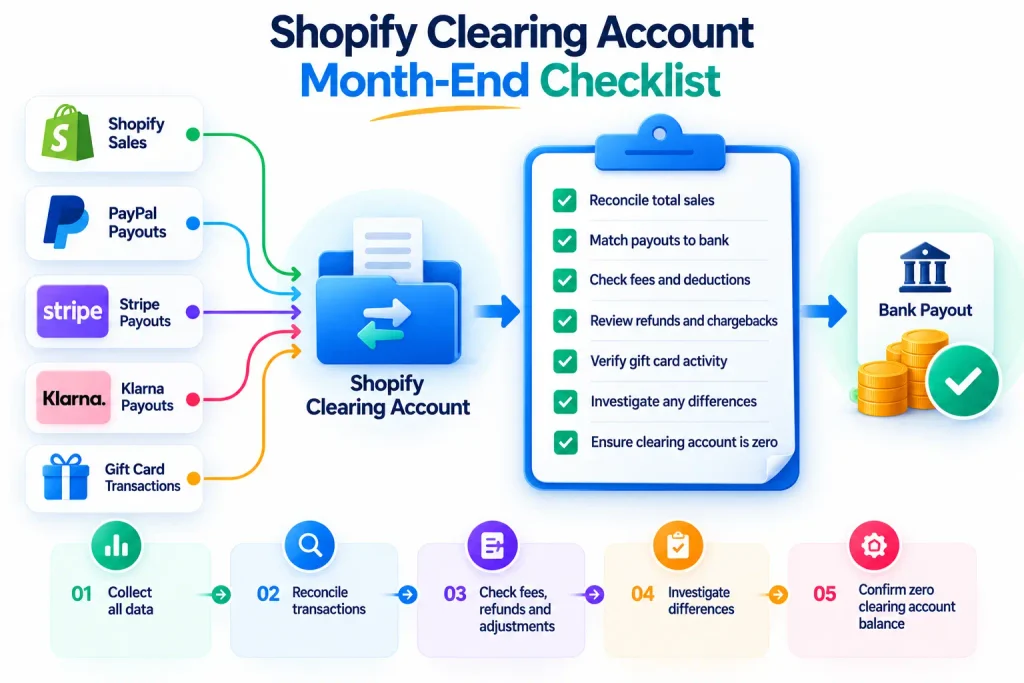
- Review the clearing account balance at month end. A remaining balance should equal sales not yet paid out, plus any reserves. If it does not, something is missing.
- Investigate what is left. Remaining differences are usually chargebacks, reversals, app or label charges, or a payout recorded twice. Work through them one by one rather than writing them off.
- Document your process. Write down how each item is coded so the same treatment is applied every month. Consistency is what keeps the books clean.
How Long Does Shopify Payout Reconciliation Take?
For a store with a few payouts a week and one payment gateway, monthly Shopify payout reconciliation can take an hour or two once the setup is right. For stores that have fallen months behind, especially those using several gateways and currencies, catching up can take considerably longer. Getting the accounting structure right early saves time and helps prevent reconciliation problems.
How Does a Clearing Account Help with Shopify Payout Reconciliation?
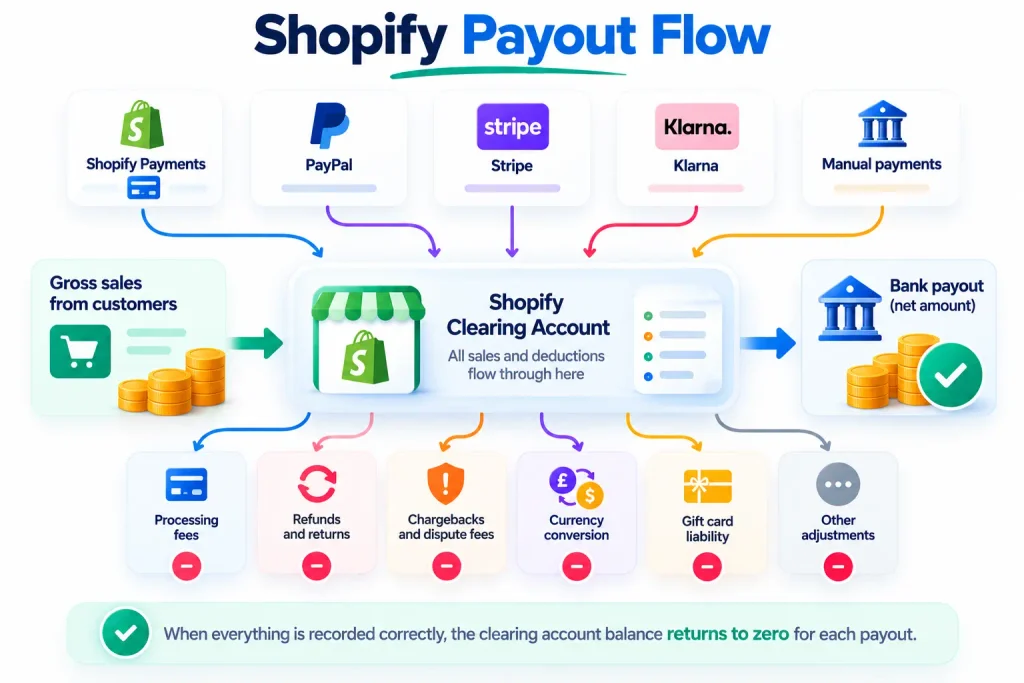
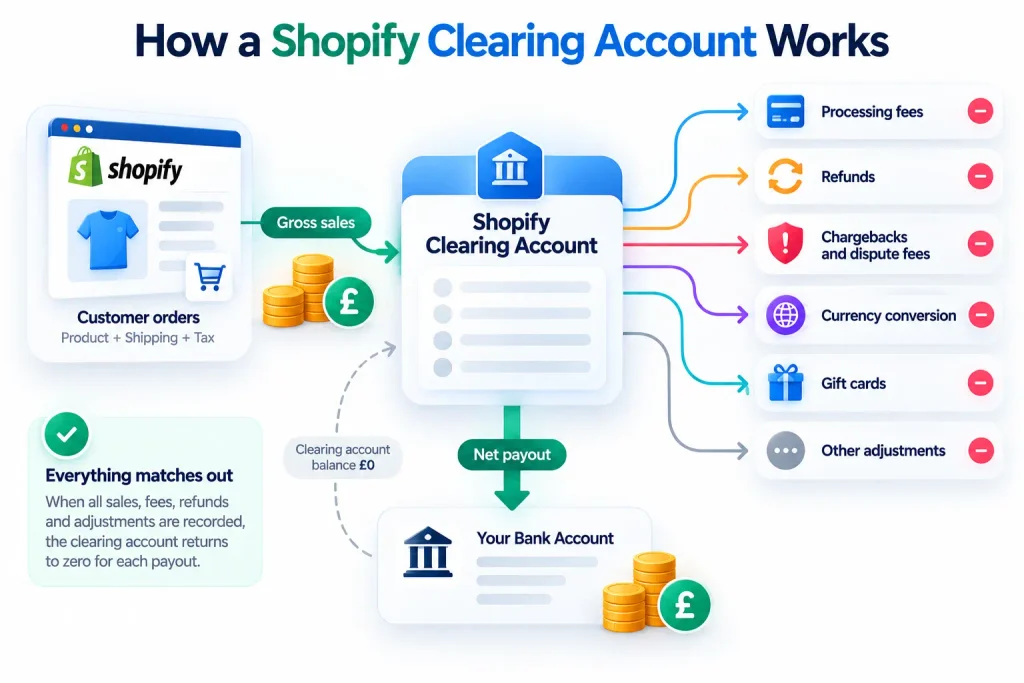
A Shopify clearing account is a temporary holding account in your accounting software. It plays an important role in Shopify payout reconciliation by tracking gross sales, tax, refunds, fees and bank deposits. When all transactions for a particular payout are recorded correctly, its balance returns to zero for that payout. Any remaining balance should be reviewed for unsettled sales, reserves or other outstanding transactions.
Why a clearing account works
Think of the clearing account as a waiting room. Money enters when a sale is made and leaves when Shopify pays you. Everything that reduces the payout, such as fees or refunds, is recorded on the way through. This gives you accurate gross revenue, visible costs and a bank reconciliation that matches to the penny.
In Xero, the clearing account is usually set up as a bank account so deposits can be matched easily. In QuickBooks Online, many bookkeepers use a dedicated clearing bank account or a current asset account. Either way, create one clearing account per payment gateway: one for Shopify Payments, one for PayPal, one for Stripe and so on.
Recommended Accounts for Shopify Payout Reconciliation
At a minimum, a Shopify store should have these accounts:
- Shopify Payments clearing account (one per gateway)
- Sales by channel (for example, Shopify sales, Amazon sales)
- Shipping income
- Refunds and returns (or a contra-revenue account)
- Merchant and payment processing fees
- Chargebacks and chargeback fees
- Foreign exchange fees and gains or losses
- Gift card liability
- VAT, GST or sales tax liability
- Funds held by payment provider (for reserves)
Shopify Payout Reconciliation: A Worked Accounting Example
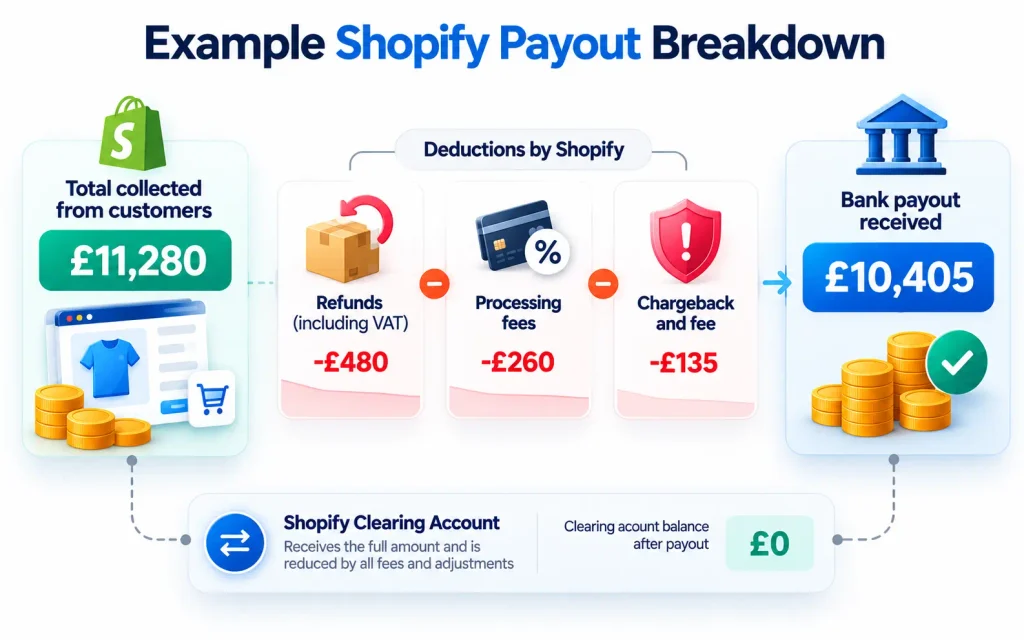
Imagine a UK store receives a single Shopify Payments payout of £10,405. The payout report shows the following components. The same structure works in any currency and country, with your local tax rate.
| Entry | Account | Debit (£) | Credit (£) |
|---|---|---|---|
| Orders received | Shopify clearing | 11,280 | |
| Product sales | 9,000 | ||
| Shipping income | 400 | ||
| VAT on sales (20%) | 1,880 | ||
| Refunds issued | Product sales | 400 | |
| VAT on sales | 80 | ||
| Shopify clearing | 480 | ||
| Processing fees | Merchant fees | 260 | |
| Shopify clearing | 260 | ||
| Chargeback and fee | Chargebacks | 120 | |
| Chargeback fees | 15 | ||
| Shopify clearing | 135 | ||
| Payout received | Bank | 10,405 | |
| Shopify clearing | 10,405 |
The clearing account receives £11,280 and releases £480 + £260 + £135 + £10,405, which also totals £11,280. It is back to zero, and the payout is reconciled. Compare this with recording the £10,405 payout as sales. True net sales are £9,000 excluding VAT, so revenue would be overstated by £1,405, because VAT is buried inside it. At the same time, £395 of fees and chargebacks would vanish from your costs, and your VAT return would be built on the wrong figures.
Check the tax treatment of payment processing fees with your accountant, as it differs between countries.
Should you use a connector app?
Connector apps such as A2X and Link My Books can support Shopify payout reconciliation by reading payout data and posting summarised accounting entries to Xero or QuickBooks. With the correct setup, these tools can reduce manual work, improve consistency and help growing stores keep their sales and bank records organised.
However, a connector only automates the process you design. If your account mapping, tax settings or gateway setup is wrong, the app will post wrong figures faster. Set up the chart of accounts and mappings carefully, test a few payouts manually, and review the clearing account every month.
Avoid connecting Shopify so that it pushes every individual order into your accounting software as a separate invoice. For stores with high order volumes, this creates thousands of transactions that are hard to reconcile against batched payouts.
Common Shopify Bookkeeping and Payout Reconciliation Mistakes
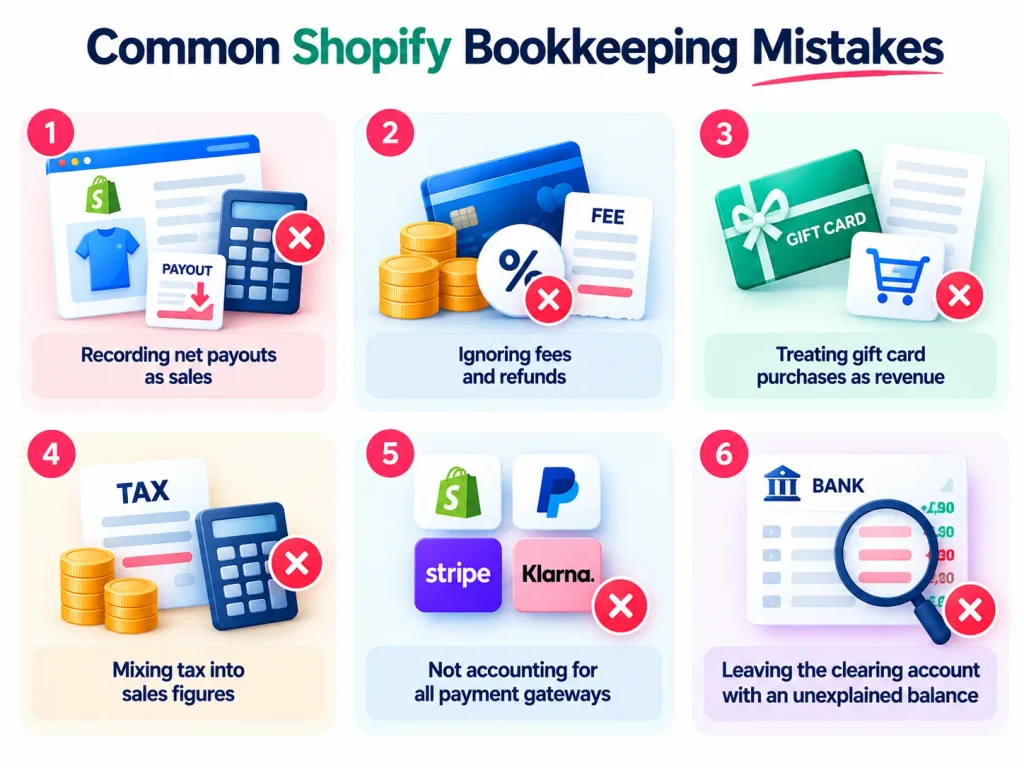
The most common Shopify bookkeeping mistakes include recording net payouts as sales, ignoring fees and refunds, treating gift card purchases as revenue, mixing tax into sales, overlooking other payment gateways and leaving unexplained clearing account balances. Poor Shopify payout reconciliation can make these problems harder to identify, leading to inaccurate financial reports and tax calculations. The longer these mistakes remain unresolved, the more difficult they become to correct.
Recording payouts as sales
This is the single biggest mistake we see. It is quick, and the bank reconciliation looks tidy. But revenue is wrong, fees are hidden, and your gross margin is unknowable. Lenders, investors and tax authorities expect gross figures.
Ignoring fees as a cost of selling
Payment fees, app subscriptions and marketplace charges can add up to a meaningful share of revenue. When they are netted off sales, you cannot see them, compare them or negotiate them. Recording them separately often reveals savings, such as a cheaper plan or a better gateway mix.
Mixing tax into revenue
VAT, GST and sales tax collected from customers is not your income. If it is left inside sales, your profit is overstated and your tax returns may not match your records. This is especially risky for sellers registered in several countries or US states.
Forgetting PayPal and other gateways
Many stores reconcile Shopify Payments carefully and forget that a fifth or more of their orders were paid through PayPal or a buy now, pay later provider. Those payouts end up coded as “other income” or left unreconciled.
Letting the clearing account drift
A clearing account that never returns to a sensible balance is a warning sign. Small unexplained differences each month turn into a large, unexplainable balance at year end. Review it monthly and clear differences while the detail is fresh.
Falling months behind
Reconciling one month takes an hour or two. Reconciling twelve months at once, often under tax-deadline pressure, is far harder. Exports are larger, memories fade, and errors are harder to trace.
When should you get help with your Shopify books?
You should consider professional help with Shopify payout reconciliation when your bookkeeping is more than two or three months behind, your clearing account has an unexplained balance, or you sell through several payment gateways, channels or currencies. Support is also useful before a tax return, funding round or business sale, when accurate financial records become particularly important.
Common signs your Shopify books need rescuing include:
- Your accounts show sales that do not match your Shopify reports
- Payouts have been coded as sales, transfers or “miscellaneous income”
- There are unreconciled bank transactions going back months
- You do not know your true gross margin by product or channel
- Your VAT, GST or sales tax returns were filed from estimates
- Your accountant has asked for clean records before they can finish your year end
- You also sell on Amazon, eBay, Etsy or TikTok Shop, and the numbers are mixed together
None of these are unusual, and none are beyond repair. A structured catch-up, working payout by payout through a clearing account, can bring even several years of messy records back into order. Once that is done, a connector app and a short monthly review keep them clean.
Frequently asked questions
Why is my Shopify payout less than my sales?
Your payout is net of processing fees, refunds, chargebacks, currency conversion fees and any reserves or adjustments. It may also cover a different date range from your sales report. Break the payout into its components using the payout report to see exactly where the difference comes from.
How long do Shopify payouts take to reach my bank?
It depends on your country, your payout schedule and your bank. Shopify Payments pays on a daily, weekly or monthly schedule set by region and account. Check the payouts section of your Shopify admin for your current schedule and expected dates.
Should I record Shopify payouts as sales?
No. Record gross sales, shipping, tax, refunds and fees separately through a clearing account, then match the payout to your bank deposit. Recording payouts as sales misstates revenue, hides costs and can lead to incorrect tax returns.
What is the best way to reconcile Shopify with Xero or QuickBooks?
Use a Shopify clearing account in Xero or QuickBooks Online and post one summary entry per payout. A connector app such as A2X or Link My Books can automate this once your chart of accounts and tax settings are mapped correctly.
How do I record Shopify fees in my accounts?
Record Shopify Payments processing fees as an expense, such as merchant fees or payment processing costs. Record your Shopify subscription and app charges separately, usually as software expenses. Check the tax treatment of fees in your country with your accountant.
How do I account for PayPal payments on Shopify?
Treat PayPal as a separate gateway with its own clearing account. Record the sales and fees from PayPal’s statement, then match transfers from PayPal to your bank. PayPal orders will not appear in your Shopify Payments payouts.
Can I fix months or years of messy Shopify books?
Yes. Historic payouts can be reconstructed from Shopify’s payout and order exports, gateway statements and bank records. The work is done payout by payout through a clearing account, and the earlier you start, the easier it is.
How to Keep Your Shopify Payouts and Accounts Accurate
Shopify payouts rarely match your sales totals or bank deposits directly, and that is normal. Processing fees, refunds, chargebacks, reserves, timing differences, currency conversion and multiple payment gateways all affect the final amount received. Regular Shopify payout reconciliation helps you understand these differences and maintain accurate accounting records.
What is not normal, and not safe, is letting those differences go unrecorded. With a clearing account for each gateway, gross sales and deductions recorded separately, and a monthly check that each payout matches its deposit, your Shopify books become accurate, tax-ready and genuinely useful for running your business.
If your Shopify payouts are a mystery, or you have fallen months behind, Rescue My Books can help you untangle them and get back on track.