Why Shopify, PayPal and Stripe Payments Need Clearing Accounts
Most online sellers do not take payment in one place. A typical Shopify store might process cards through Shopify Payments, accept PayPal at checkout, run subscriptions or B2B invoices through Stripe, and offer Klarna or Shop Pay Installments for bigger baskets. Each of these pays out on its own schedule, in its own amounts, with its own fees.
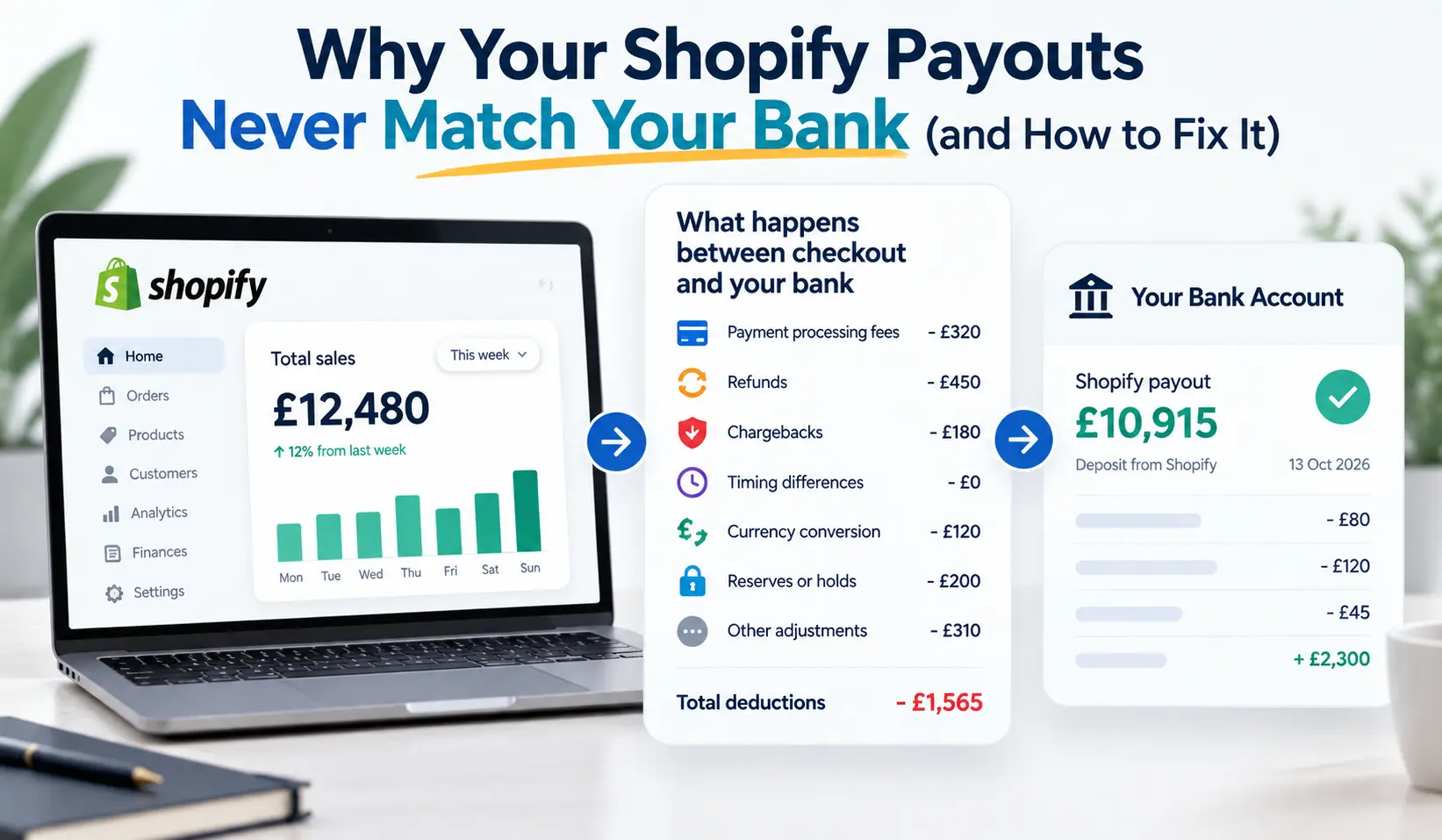
When all of that money lands in one business bank account, the result is a statement full of odd, rounded-looking deposits that bear no obvious relationship to your sales. Without the right structure in your accounting software, those deposits get coded as “sales”, “transfers” or “miscellaneous income”, and your books quietly drift away from reality.
The right structure is a set of clearing accounts. They are one of the simplest tools in e-commerce bookkeeping, and also one of the most often set up badly, or not at all. In this guide, we explain what clearing accounts are, how many you need, and how to set them up for Shopify Payments, PayPal, Stripe and buy now, pay later providers in Xero or QuickBooks Online. We finish with a month-end review process and the mistakes to avoid.
What is the quick answer?
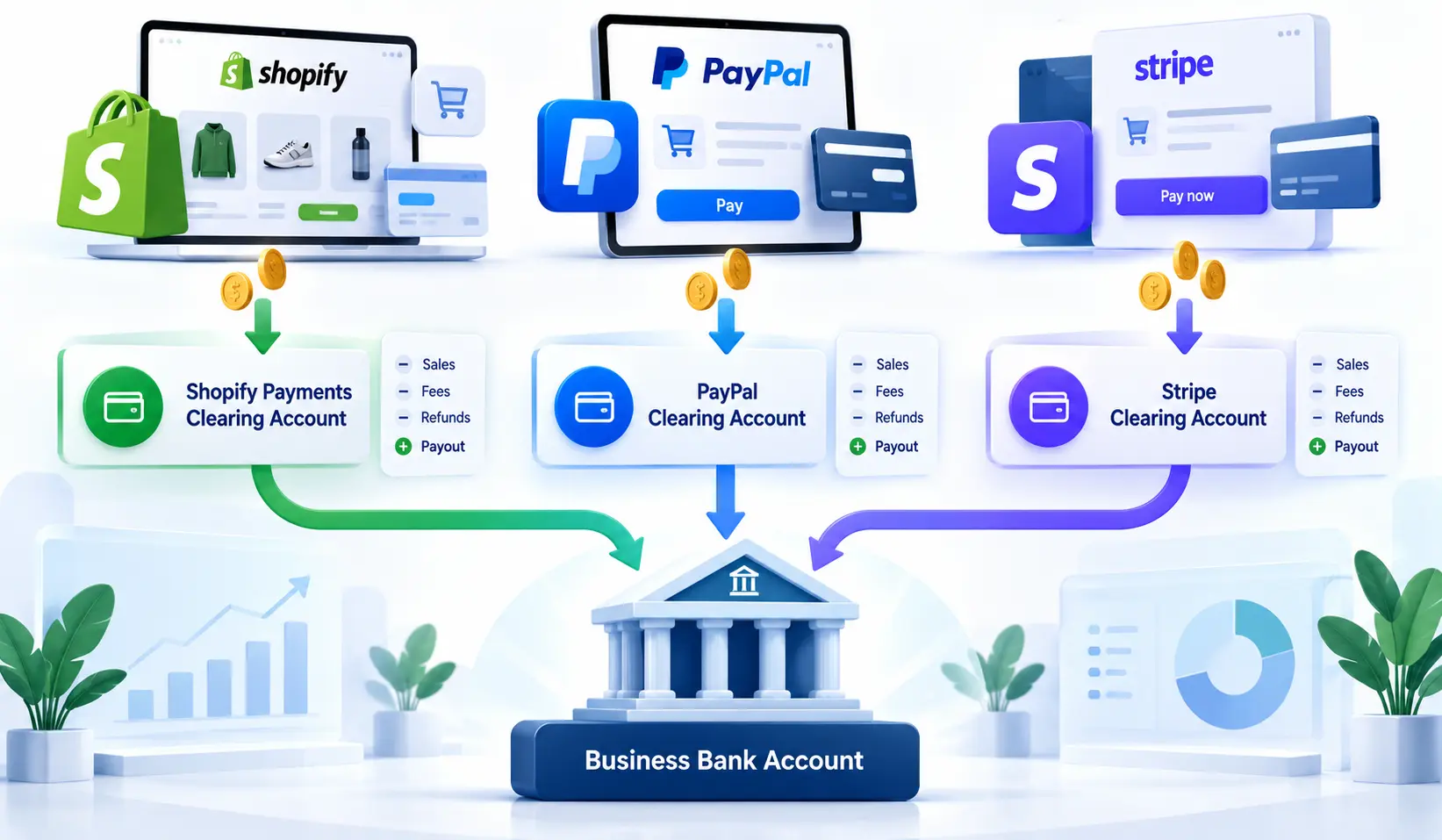
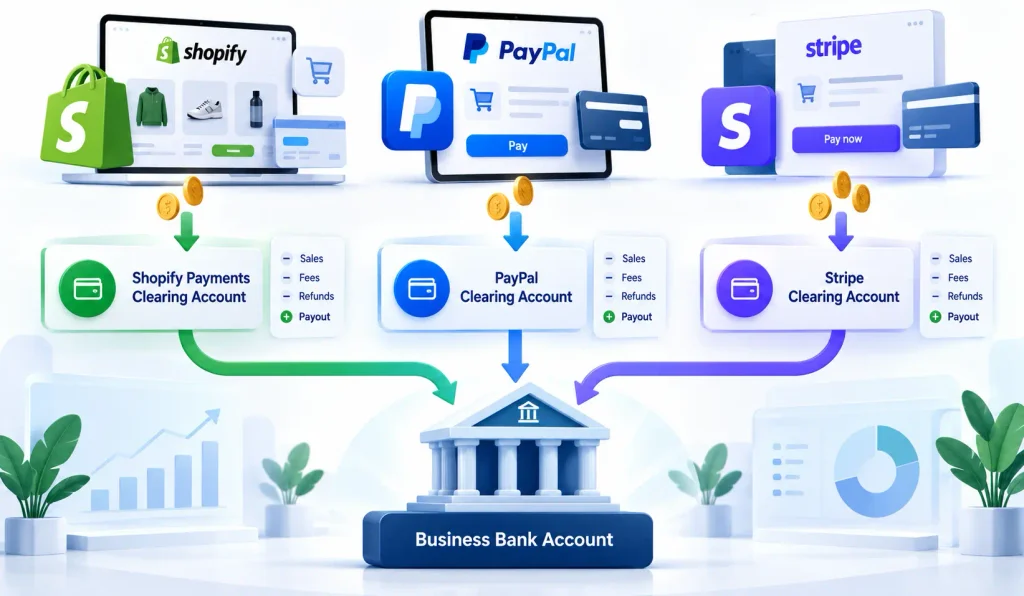
An e-commerce clearing account is a holding account for one payment gateway, such as Shopify Payments, PayPal or Stripe. You record gross sales, refunds and fees into it, and match each payout to your bank out of it. Set up one clearing account per gateway, and per currency where you hold separate balances. At month end, each balance should equal money collected but not yet paid out.
Key takeaways
- Every payment gateway needs its own clearing account. Never share one between Shopify Payments, PayPal and Stripe.
- PayPal and Stripe often need one clearing account per currency balance.
- In Xero and QuickBooks Online, set clearing accounts up as bank-type accounts so payouts can be matched.
- Record gross sales, then refunds, fees and chargebacks separately; the payout is matched last.
- At month end, each clearing balance should be explainable: unpaid sales, reserves or funds held, and nothing else.
What Is an Ecommerce Clearing Account and Why Do Sellers Need One?
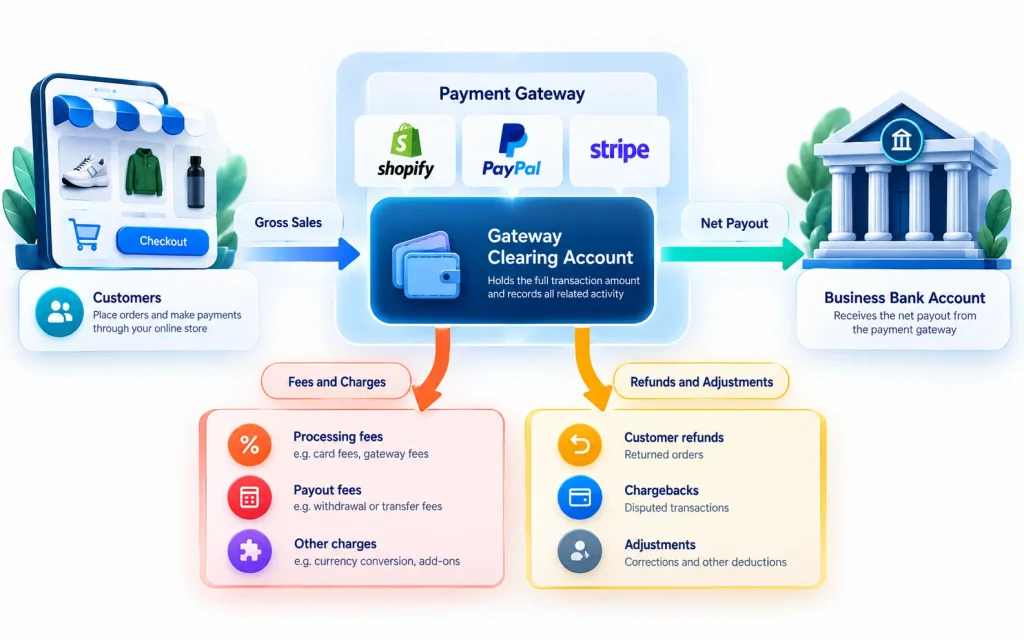
A clearing account is a temporary account that holds money in transit between a sale and your bank. Online sellers need one because payment gateways collect money on your behalf, deduct fees and refunds, then pay out net amounts days later. The clearing account bridges that gap so your sales, costs and bank balance are all accurate.
The problem clearing accounts solve
Without a clearing account, bookkeepers face an impossible choice. They can record each net payout as sales, which is fast but wrong. Or they can try to match hundreds of individual orders to a single deposit, which is slow and rarely works.
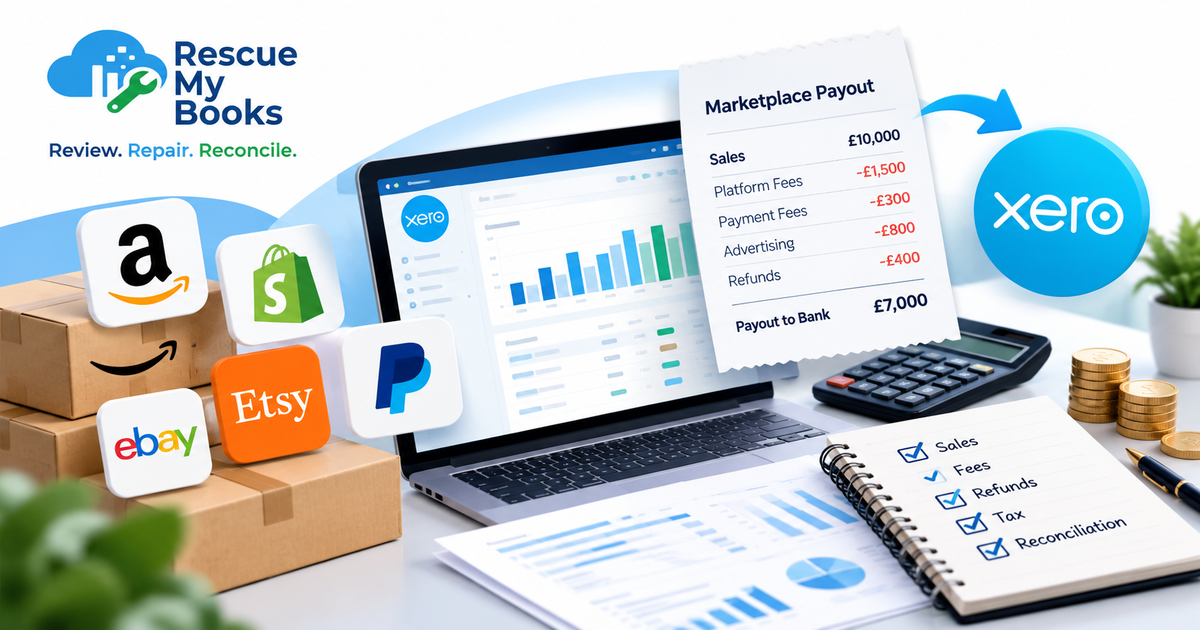
A clearing account removes that choice. Sales are recorded at their gross value when they happen. Deductions are recorded as they are taken. The payout is then matched as a simple transfer from the clearing account to your bank. Nothing is netted off, nothing is hidden, and the bank reconciles to the penny.
A useful way to think about it
Treat each payment gateway as if it were a separate bank account that you happen not to control. Shopify Payments, PayPal and Stripe all hold your money for a while. A clearing account is simply your record of that “account”: what went in, what was taken out, and what was transferred to your real bank.
This framing makes the logic obvious. You would never record a transfer from your savings account to your current account as income. A payout from PayPal to your bank is exactly the same: a transfer, not a sale.
What you gain
- Accurate gross revenue by channel and gateway
- Visible fees, so you can compare gateways and negotiate rates
- Correct tax figures, because VAT, GST or sales tax is separated from sales
- Clean bank reconciliation, with each payout matching one deposit
- An early warning system: a clearing balance that will not reconcile tells you something is wrong
How Many Ecommerce Clearing Accounts Do You Need?
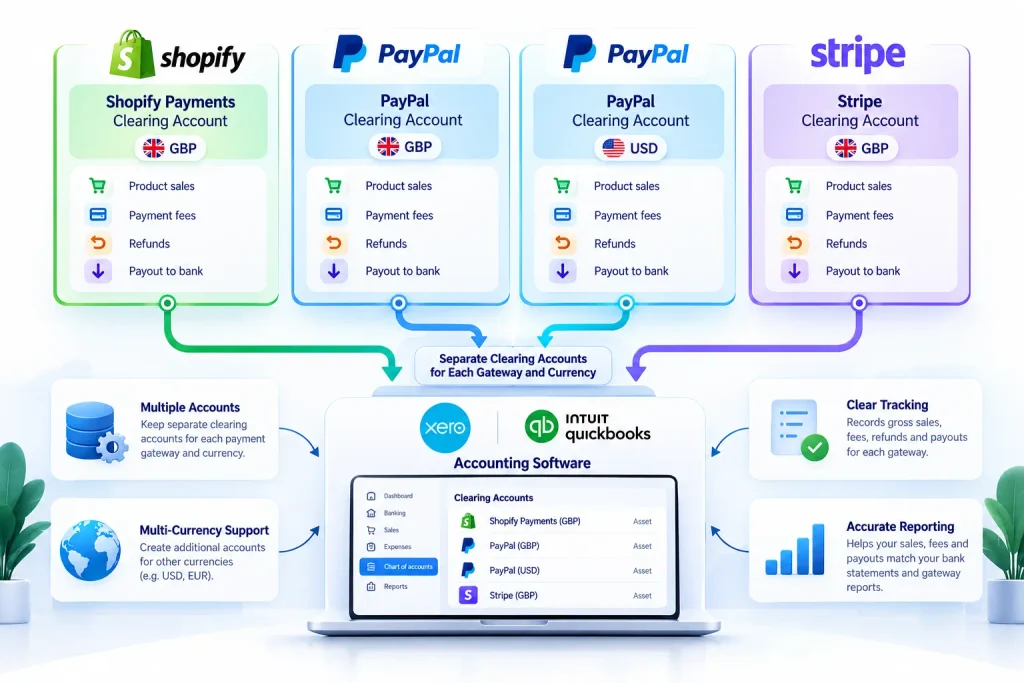
You need one clearing account for every payment gateway that holds money before paying you, and one per currency where a gateway keeps separate currency balances. A store using Shopify Payments, PayPal in GBP and USD, and Stripe would typically need four clearing accounts. Manual methods such as bank transfer usually need none.
| Payment method | Clearing account needed? | Typical setup |
|---|---|---|
| Shopify Payments | Yes | One account in your payout currency |
| PayPal | Yes | One per currency balance you hold |
| Stripe | Yes | One per settlement currency |
| Klarna, Clearpay, Afterpay | Yes | One per provider |
| Shop Pay Installments | Usually covered by Shopify Payments | Check how it appears in your payout report |
| Amazon Pay | Yes | One per provider |
| Bank transfer | No | Customer pays straight into your bank |
| Cash on delivery | Often yes | One for each courier collecting cash |
Why one account per gateway matters
It is tempting to create a single “Payment processors” clearing account and push everything through it. Do not. When the balance is wrong, you will have no way of knowing which gateway caused it. Separate accounts let you reconcile each provider against its own statement, which is the only reliable test.
Why currencies matter
PayPal and Stripe can hold balances in several currencies at once. If you sell in euros and dollars and do not convert automatically, you effectively have a euro account and a dollar account inside PayPal. Mixing them in one clearing account guarantees exchange differences you cannot trace. Match the structure of your clearing accounts to the structure of the balances the gateway actually holds.
How Do You Set Up an Ecommerce Clearing Account in Xero or QuickBooks?
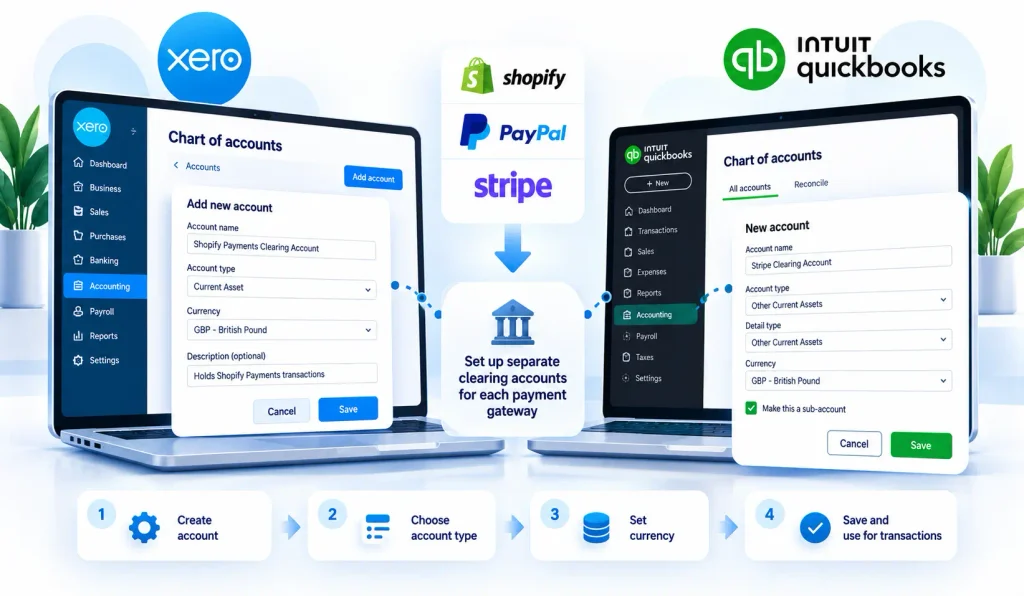
In Xero, add a new bank account, choosing the option to create one manually rather than connect a feed, and name it after the gateway. In QuickBooks Online, create a new account with the Bank type and a clear name. In both, set the currency to match the gateway balance. Sales and fees are then posted to it, and payouts are matched as transfers to your real bank.
Setting up in Xero
- Add a bank account. Go to your bank accounts and add a new one. Choose to set it up without a live bank feed.
- Name it clearly. For example, “Shopify Payments Clearing”, “PayPal Clearing GBP” or “Stripe Clearing USD”.
- Set the currency. Multi-currency is available on some Xero plans. Choose the currency the gateway holds.
- Decide how data will arrive. Options include a connector app such as A2X or Link My Books, a statement import, or an available bank feed for that provider.
- Set up bank rules carefully. Rules in your main bank account should code incoming payouts as transfers from the right clearing account, never as sales.
Setting up in QuickBooks Online
- Create a new account. Choose the Bank account type, with a detail type such as cash on hand or a similar holding account.
- Name and currency. Use the same naming convention, and set the currency if multi-currency is turned on.
- Connect or import data. Use a connector app, the provider’s own integration, or statement imports.
- Handle payouts as transfers. Record each payout as a transfer from the clearing account to your business bank account.
- Watch for duplicates. If you also connect the gateway directly, make sure the same sales are not recorded twice through two routes.
Before you connect anything, decide your chart of accounts
Connector apps post data into the accounts you map. Set these up first:
- Sales accounts by channel (Shopify, Amazon, wholesale)
- Shipping income
- Refunds or returns
- Payment processing fees, one line per gateway if you want to compare them
- Chargebacks and dispute fees
- Foreign exchange fees and gains or losses
- Gift card liability
- Tax liability accounts for each tax registration
- Funds held by payment provider (for reserves)
Getting the mapping right before importing a single payout saves hours of correcting journals later.
How do you set up a Shopify Payments clearing account?
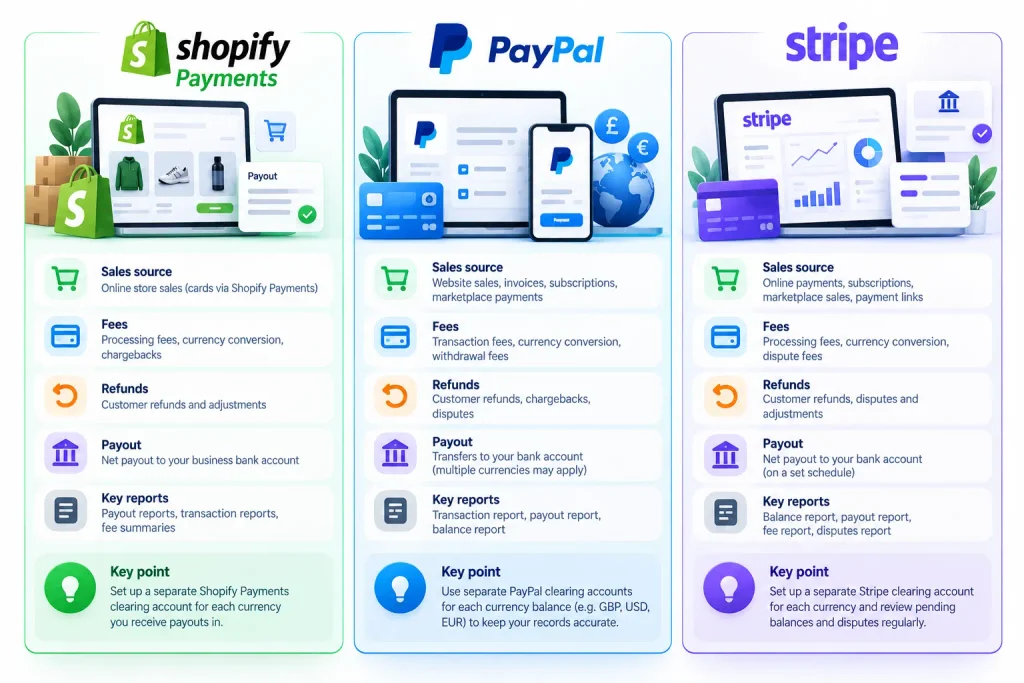
Create one clearing account in your Shopify Payments payout currency. Post each payout’s gross sales, shipping, tax, discounts, refunds, fees, chargebacks and adjustments into it from the Shopify payout report, then match the payout to your bank deposit. Each payout should leave the clearing account at zero, apart from sales not yet paid out.
Work payout by payout, not day by day
Shopify groups transactions into payouts, and the payout report lists exactly which orders, refunds and adjustments each one contains. Recording one summary entry per payout, rather than one per day or per order, means every entry has a matching bank deposit. That is what makes the reconciliation fast and reliable.
Watch for items outside the payout
Some Shopify costs do not come out of payouts. Your Shopify subscription and many app charges are typically billed separately, often to a card. These are software costs and should be recorded through the card or bank they are actually paid from, not through the clearing account.
Shipping labels bought through Shopify and certain adjustments can appear on your Shopify bill or be taken from your balance, depending on your setup. Check where each one is actually paid from before deciding how to record it.
Handle reserves as an asset
If Shopify holds back part of your balance as a reserve, move that amount from the clearing account into a “Funds held by payment provider” asset account. When the reserve is released, move it back. This keeps the clearing account clean and makes sure held money never disappears from your balance sheet.
Remember Shopify is only one stream
Your Shopify sales report includes orders paid through PayPal, Stripe and other providers. A Shopify Payments clearing account only covers Shopify Payments. Filter your reports by payment gateway so each clearing account receives only its own sales.
How do you set up a PayPal clearing account?
Create a PayPal clearing account for each currency balance you hold in PayPal. Record sales and refunds at their gross value, post PayPal fees as an expense, record currency conversions between balances, and treat every withdrawal to your bank as a transfer. Reconcile the clearing account to the PayPal statement balance for each currency at month end.
Why PayPal is harder than it looks
PayPal behaves much more like a bank account than Shopify Payments does. Money can sit in it indefinitely. You might pay suppliers, refund customers or buy ads directly from your PayPal balance. Funds might be held during a dispute. You might hold several currencies and convert between them.
All of this means a PayPal clearing account will not simply empty out with each withdrawal. Instead, it should always equal your actual PayPal balance on any given date.
What to record in a PayPal clearing account
- Customer payments at the gross amount, split into sales, shipping and tax where needed
- PayPal fees on each transaction, as a payment processing expense
- Refunds to customers, reversing sales and tax
- Disputes and holds, moved to funds held if PayPal restricts them
- Currency conversions between PayPal balances, with any conversion fee or exchange difference
- Payments made from PayPal, such as supplier bills or subscriptions, coded to the right expense
- Withdrawals to your bank, recorded as transfers
Getting the data in
Xero and QuickBooks Online both offer ways to bring in PayPal transactions, including feeds and statement imports, and connector apps can post summarised entries instead. Whichever you choose, use one route only. Combining a PayPal feed with a connector app is one of the most common causes of duplicated sales.
The key test
At month end, download the PayPal statement or balance report for each currency. The clearing account balance in your books should equal the PayPal balance on the same date. If it does, PayPal is reconciled. If it does not, the difference is your to-do list.
How do you set up a Stripe clearing account?
Create a Stripe clearing account for each settlement currency. Record gross charges, refunds, Stripe fees, disputes and adjustments from Stripe’s balance and payout reports, then match each Stripe payout to your bank deposit. At month end, the clearing balance should equal your Stripe balance, including funds that are pending and not yet paid out.
Use Stripe’s reports, not the dashboard totals
Stripe provides reporting that shows every movement in your balance and which transactions make up each payout. These reports are far more useful for bookkeeping than headline revenue figures, because they separate charges, refunds, fees, disputes and transfers. Export them monthly and keep them with your records.
Common Stripe use cases for online sellers
Online sellers often use Stripe alongside Shopify for subscriptions, wholesale or B2B invoices, custom checkouts or marketplace payments. Each of these can need different sales accounts. Map Stripe products or metadata to the right revenue accounts so wholesale income is not mixed with retail sales.
Watch for disputes and refunds after payout
When a Stripe customer raises a dispute, the amount and a dispute fee are usually taken from your balance. If the balance is not enough, Stripe may debit your bank. Record these as chargebacks and fees through the clearing account, even when the money leaves from your bank, so the trail stays complete.
Avoid double counting
If Stripe processes payments for invoices raised in Xero or QuickBooks, the invoices are already recorded as sales. In that case, the Stripe clearing account should record payments against those invoices, not new sales. Decide which system records the sale before connecting any integration.
How do you handle Klarna, Shop Pay Installments and other gateways?
Treat buy now, pay later providers and other gateways like any other payment processor. Give each one its own clearing account, record the full sale value when the order is placed, post the provider’s fees separately, and match each settlement to your bank. The customer paying in instalments does not change your accounting: you are normally paid by the provider, not the customer.
Buy now, pay later providers
With Klarna, Clearpay, Afterpay and similar services, the provider usually pays you the order value, minus its fee, and then collects instalments from the customer itself. From a bookkeeping point of view, that means:
- The sale is recognised in full when the order is placed
- The fee is a cost of selling, often higher than standard card fees
- Settlements arrive on the provider’s schedule, not the customer’s
- Refunds and returns are deducted from future settlements
Shop Pay Installments may be settled through your Shopify Payments payouts rather than separately. Check your Shopify payout report to see how these orders appear, and only create a separate clearing account if they are paid out separately.
Amazon Pay and other checkouts
Amazon Pay, Apple Pay through different processors, and regional payment methods follow the same rule. If money is collected by someone else and paid to you later, it needs a clearing account. If it lands directly in your bank as the customer pays, it does not.
Marketplaces are different again
Amazon Seller Central, eBay, Etsy and TikTok Shop act as both a sales channel and a payment collector. They also need clearing accounts, but their settlement reports include marketplace fees, advertising, storage and more. We cover these in our guides to Amazon settlement reports and multi-channel bookkeeping.
How Do You Reconcile Ecommerce Clearing Accounts at Month End?
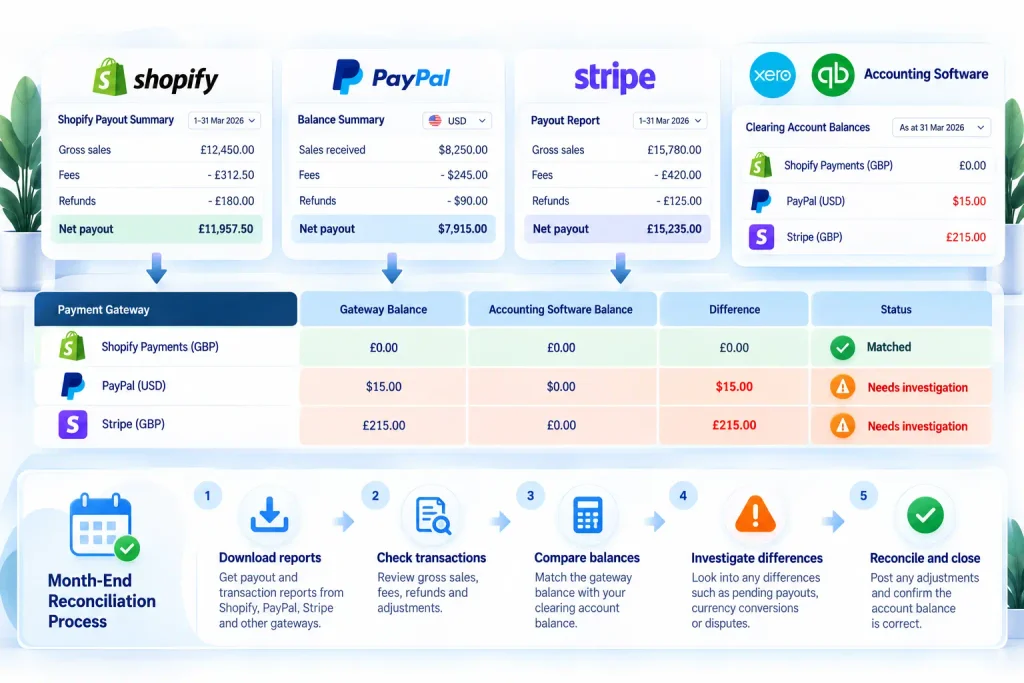
At month end, compare each clearing account balance in your books with the provider’s own balance or payout report for the same date. The two should match, or the difference should be fully explained by sales not yet paid out or funds held. Any unexplained difference should be investigated and corrected before the month is closed.
Worked example: a month-end clearing review
Here is what a month-end review might look like for a UK seller using four gateways. Figures are illustrative.
| Clearing account | Balance in books | Provider balance or report | Difference | Explanation |
|---|---|---|---|---|
| Shopify Payments (GBP) | £3,240 | £3,240 pending payout | £0 | Sales from the last three days, paid out next month |
| PayPal (GBP) | £1,860 | £1,860 | £0 | Reconciled |
| PayPal (USD) | $512 | $497 | $15 | Currency conversion fee not yet recorded |
| Stripe (GBP) | £4,105 | £4,320 | -£215 | Won dispute: funds returned but not recorded |
| Klarna (GBP) | £960 | £960 due in next settlement | £0 | Reconciled |
Two of the five accounts need correcting. The PayPal USD account needs a $15 conversion fee posting. The Stripe account needs the £215 dispute reversal recording, which also reduces the chargebacks expense. Once both are posted, every clearing balance is explained.
Month-end checklist
- ☐ Download balance or payout reports from every gateway for the last day of the month
- ☐ Compare each report with the matching clearing account balance
- ☐ Confirm every payout in the month is matched to a bank deposit
- ☐ Move any reserves or held funds to the funds held account
- ☐ Record currency conversions and exchange differences
- ☐ Investigate and correct every unexplained difference
- ☐ Save the reports with the month’s records
Troubleshooting a balance that will not clear
If a clearing account will not reconcile, the cause is usually one of these:
- Duplicated sales, from two integrations posting the same orders
- A payout coded straight to sales in the bank, bypassing the clearing account
- Missing refunds or chargebacks, especially those debited from the bank
- Wrong gateway, with PayPal orders posted to the Shopify Payments clearing account
- Unrecorded fees, such as conversion, dispute or instalment fees
- A starting balance error, carried over from before the clearing account existed
Work backwards month by month to find the first month where the balance went wrong. Fix that month, and the later months often fall into place.
What Are the Most Common Ecommerce Clearing Account Mistakes?
The most common clearing account mistakes are using one clearing account for all gateways, ignoring currency balances, connecting two integrations that both post sales, coding payouts as income in the bank, and never reviewing the balance. Each one turns a simple control into a growing, unexplained figure on the balance sheet.
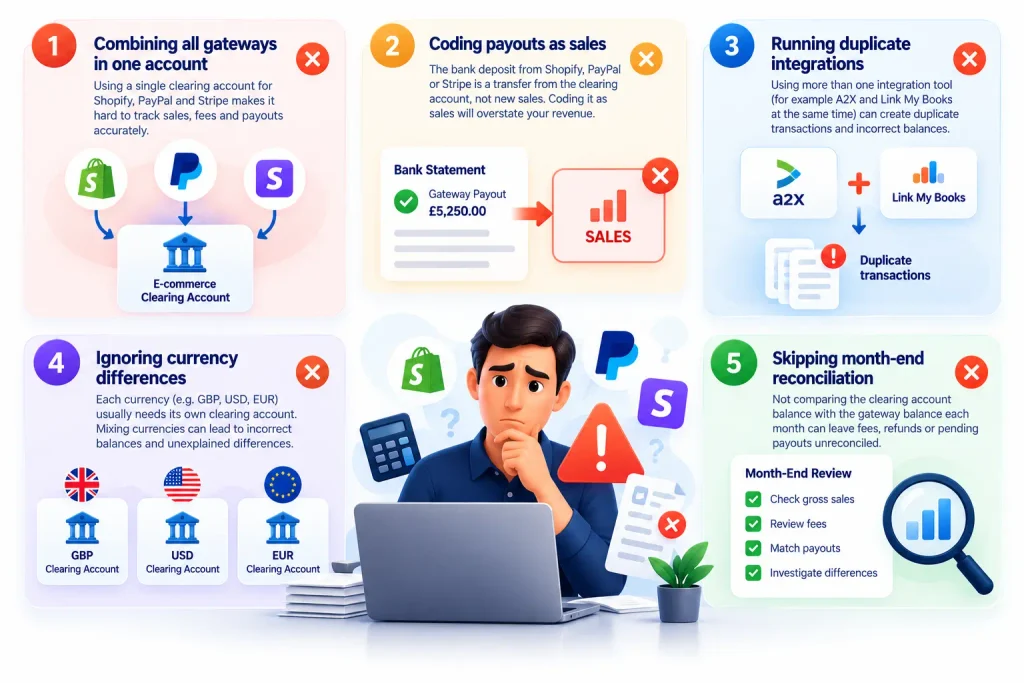
Using a single clearing account for everything
One account for every gateway might look tidy, but it makes reconciliation impossible. When the balance is wrong, you cannot tell which provider caused it.
Letting bank rules code payouts as sales
Automatic bank rules are useful, but a rule that codes “SHOPIFY” or “PAYPAL” deposits to sales undoes all the work of the clearing account. Every payout should be a transfer from the right clearing account.
Running two integrations at once
A native PayPal feed plus a connector app, or a Shopify order sync plus A2X, will record the same sales twice. Choose one route per gateway and switch the others off.
Ignoring the opening balance
When clearing accounts are introduced part way through a year, there is usually money already sitting in each gateway. Record that opening balance properly, or the account will never reconcile.
Never looking at it
A clearing account is a control, not a dumping ground. If no one reviews it monthly, small errors pile up until year end, when they are hardest and most expensive to unpick.
Frequently Asked Questions About Ecommerce Clearing Accounts
What is a clearing account in e-commerce?
It is a holding account in your accounting software for money collected by a payment gateway, such as Shopify Payments, PayPal or Stripe, before it reaches your bank. Gross sales, refunds and fees go in, and payouts to your bank come out.
Is a clearing account an asset or a bank account?
It represents money owed to you by the payment provider, so it is an asset. In Xero and QuickBooks Online, it is usually set up as a bank-type account so payouts can be matched as transfers.
Do I need a separate clearing account for PayPal and Shopify?
Yes. Each gateway pays out separately and has its own statement, so each needs its own clearing account. Combining them makes it impossible to see which provider is causing a difference.
Should a clearing account always be zero?
Not always. At any date, it should equal money collected but not yet paid out, plus anything the provider is holding. For PayPal and Stripe, it should equal your balance with that provider on the same date.
How do I reconcile PayPal in Xero?
Set up a PayPal clearing account for each currency, bring in PayPal transactions through one route only, record fees and conversions, and treat withdrawals as transfers to your bank. Then check the clearing balance against your PayPal statement at month end.
How do I record Stripe payouts in QuickBooks Online?
Record Stripe charges, refunds and fees in a Stripe clearing account, then record each payout as a transfer from that account to your bank. Use Stripe’s balance and payout reports to check that everything is included.
Can a connector app set up clearing accounts for me?
Connector apps such as A2X and Link My Books post entries into clearing accounts, but you still decide the account structure and mapping. Set up the chart of accounts and test a few payouts before relying on automation.
Final Thoughts on Shopify, PayPal and Stripe Clearing Accounts
Managing Shopify Payments, PayPal and Stripe clearing accounts correctly is essential for accurate ecommerce bookkeeping. Each payment gateway collects customer payments, deducts processing fees and transfers the remaining funds to your business bank account. Without properly configured clearing accounts, tracking sales, refunds and payouts can become difficult, leading to incorrect balances and unreliable financial reports.
To keep your records accurate, maintain separate clearing accounts for each payment gateway and currency where required. Record gross sales, fees and refunds correctly, treat payouts as bank transfers rather than additional income, and reconcile each clearing account against the payment provider’s reports every month. Regular reviews help identify missing transactions, duplicate entries and unexplained balances before they become bigger accounting problems.
Need Help Fixing Your Shopify, PayPal or Stripe Clearing Accounts?
Are unexplained balances, missing payouts or incorrect transactions affecting your ecommerce bookkeeping? Rescue My Books can help identify discrepancies, correct historical bookkeeping errors and bring your financial records up to date.
Whether your clearing accounts were never set up correctly or your existing records need a thorough review, our team can help you regain control of your ecommerce finances.
Contact Rescue My Books Today to discuss your bookkeeping issues and find out how we can help.